While I occasionally use antigravity at work or codex at home, I mostly favor claude, both through API at work and a paid subscription at home.
To avoid giving them full machine/filesystem access and relying on their self-policing, I have always run agent through Docker. It brings me a level of isolation I am comfortable with, and which is consistent across all harnesses I use now or in the future (compared to each harness’s built-in sandbox). It also gives me profile isolation for “free”, to separate work and personal environments.
In this post, I explain the current state of my setup: dockerised harnesses, work / personal profiles with scoped API access, and an improvement over /resume to search and recover past sessions and plans using planviewer.
Dockerised harnesses
claudecode builds images for each of the harnesses I use (claude, codex, agy, …), with a selection of tools I need for my day to day (interpreters, compilers, cloud CLIs, dev tools, etc). It also contains Chromium and Playwright for some QA validation.
I start them with aliases for the following commands:
# claude (personal profile)
# cap memory usage and process count
# No Linux capabilities, no privilege gains/setuid etc
docker run --rm -ti --init \
  --memory "${AI_MEM:-1536m}" \
  --memory-swap "${AI_MEM:-1536m}" \
  --pids-limit 4096 \
  \
  --cap-drop ALL \
  --security-opt no-new-privileges \
  \
  --env COLORTERM=truecolor \
  --volume "$PWD:/home/node/dev/${PWD##*/}" \
  --workdir "/home/node/dev/${PWD##*/}" \
  --volume "$HOME/dotfiles/claude:/home/node/.claude" \
  --mount "type=bind,source=$HOME/dotfiles/claude/claude.json,target=/home/node/.claude.json" \
  --env-file "$HOME/.claudeenv" \
  nbr23/claudecode

# codex (personal profile)
docker run --rm -ti --init \
  [...]
  --volume "$HOME/dotfiles/codex:/home/node/.codex" \
  --volume "$HOME/dotfiles/claude/skills:/home/node/.agents/skills" \
  --volume "$HOME/dotfiles/claude/skills:/home/node/.claude/skills" \
  --mount "type=bind,source=$HOME/dotfiles/claude/CLAUDE.md,target=/home/node/.codex/AGENTS.md" \
  --env-file "$HOME/.claudeenv" \
  nbr23/claudecode:codex
It is essentially mounting a global and shared CLAUDE.md/AGENTS.md file, skills folder, as well as the current working directory. The codex, agy, etc. variants differ only in the image/entrypoint and a couple of mountpoints for their settings. The agent’s filesystem access is limited to the mounted volumes.
I have a scheduled docker pull on each nbr23/claudecode image tag I use, to keep them up to date. The images themselves keep the harnesses and tools up to date using Renovate.
Profiles
As I use these same harnesses for work and personal projects, with obviously different billing constraints, Docker makes it easy to isolate both.
For work, I have similar w-prefixed aliases like:
# wclaude (work profile)
docker run --rm -ti --init \
  [...]
  --volume "claudework-gcloud:/home/node/.config/gcloud" \
  --mount "type=bind,source=$HOME/.config/workgcp/readonly-key.json,target=/gcp/key.json,readonly" \
  --env GOOGLE_APPLICATION_CREDENTIALS=/gcp/key.json \
  --add-host XXX.local.DNS:host-gateway \
  --add-host YYY.local.DNS:host-gateway \
  --add-host ZZZ.local.DNS:host-gateway \
  --volume "$HOME/dotfiles/claudework:/home/node/.claude" \
  --env-file "$HOME/.claudeworkenv" \
  nbr23/claudecode
Follows the same principle, but mounts separate ~/.claude volumes, allowing different credentials entirely, and different CLAUDE.md, skills set etc. It also loads its own env file, with its own readonly credentials.
The --add-host lines expose my local application web services to the agent for easy debugging and Playwright-driven QA.
Profile themes
To avoid mixing up the profiles when my fingers accidentally type wclaude at a time I don’t plan on working, I’ve added a colored “WORK” / “PERSO” label to my Claude status line, and a slightly different terminal background color.
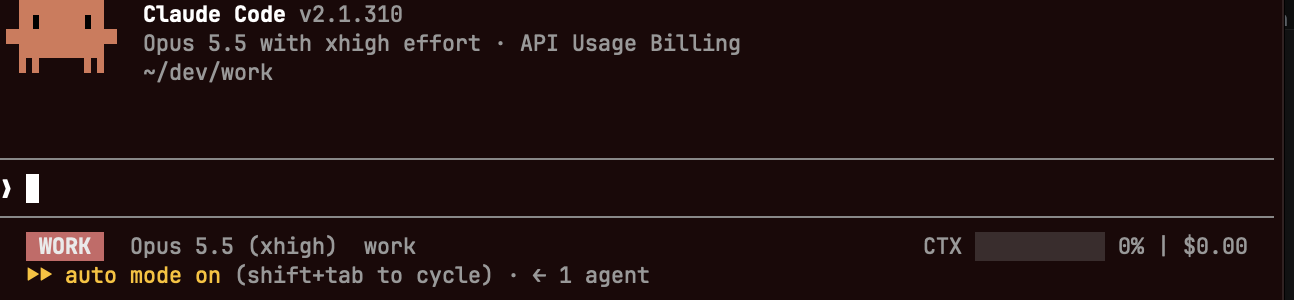
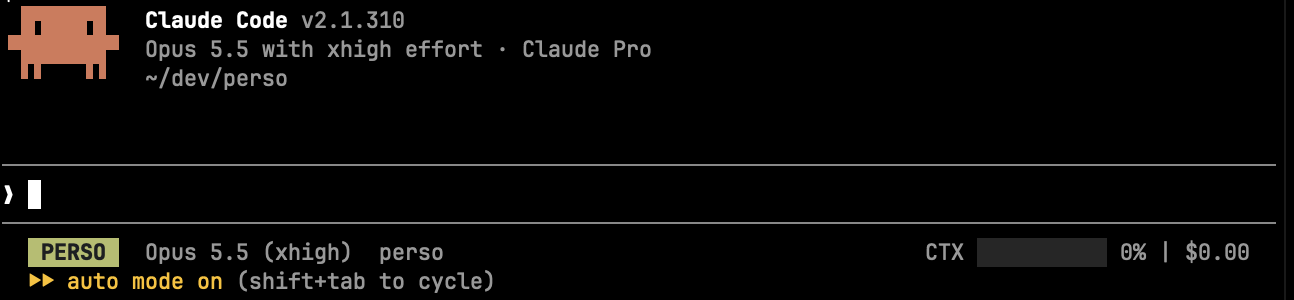
Codex doesn’t easily allow the same right now. Instead we can send OSC escape sequences in a wrapper when running the harness:
_with_bg() {
  local color=$1 rc
  shift
  [[ -t 1 ]] && printf '\e]11;%s\a' "$color"
  "$@"
  rc=$?
  [[ -t 1 ]] && printf '\e]111\a'
  return "$rc"
}

_with_bg '#081c08' codex
This will not work with an alias, define codex as a bash function instead to use this wrapper.
Read-only access
Isolating the agent from my machine using Docker gives me an easy way to grant the agent read only or limited scope access to services, while retaining broader rights myself on the host. Through env variables and mounted files (like the GCP readonly key), the agents are given enough rights to pull metrics, logs, LangSmith traces, search for cloud resources, without using my broader scoped credentials.
I extend this when needed to the host’s Docker socket: when developing and running a stack of apps locally through Docker Compose for example, I run wollomatic/socket-proxy with a restricted configuration (allowing log reads, container state reads and container restarts) to give claude some autonomy in debugging in progress work, without giving full Docker socket access (which could effectively open the door to host root access).
services:
  docker-socket-proxy:
    image: wollomatic/socket-proxy:1
    restart: unless-stopped
    read_only: true
    cap_drop:
      - ALL
    security_opt:
      - no-new-privileges:true
    command:
      - '-listenip=0.0.0.0'
      - '-allowfrom=0.0.0.0/0'
      - '-allowGET=/(v[0-9.]+/)?(_ping|version|info|events(\?.*)?|containers/json(\?.*)?|containers/[a-zA-Z0-9_.-]+/(json|logs|top|stats|changes)(\?.*)?)'
      - '-allowHEAD=/(v[0-9.]+/)?_ping'
      - '-allowPOST=/(v[0-9.]+/)?containers/[a-zA-Z0-9_.-]+/restart(\?.*)?'
    ports:
      - '127.0.0.1:2375:2375'
    volumes:
      - /var/run/docker.sock:/var/run/docker.sock:ro
    networks:
      - agent-proxy

networks:
  agent-proxy:
    external: true # create it once with `docker network create agent-proxy`
Note that the current allowGET rule permits full container inspection. Depending on what environment vars (API secrets etc) get injected, this would give your agent read access to those secrets.
The agents can then do Docker operations using the API directly, or the Docker CLI, e.g.:
export DOCKER_HOST=tcp://docker-socket-proxy:2375
docker restart mycontainer
You will need to pass --network agent-proxy to your agents. On Docker Desktop, we can do without the networks: declaration and simply use:
export DOCKER_HOST=tcp://host.docker.internal:2375
Planviewer
Being the kind of person with too many tabs open in Firefox, I promptly adapted to the AI era, and typically have many Claude sessions open and many plans planned.
I often defer them (sometimes with the OOM Killer’s kind help), and always struggle to find them back using /resume.

This meant having to grep through my ~/.claude for words I thought had appeared during the session or plan, or burning tokens and money asking Claude for some introspection to try and find old sessions/plans to restore.
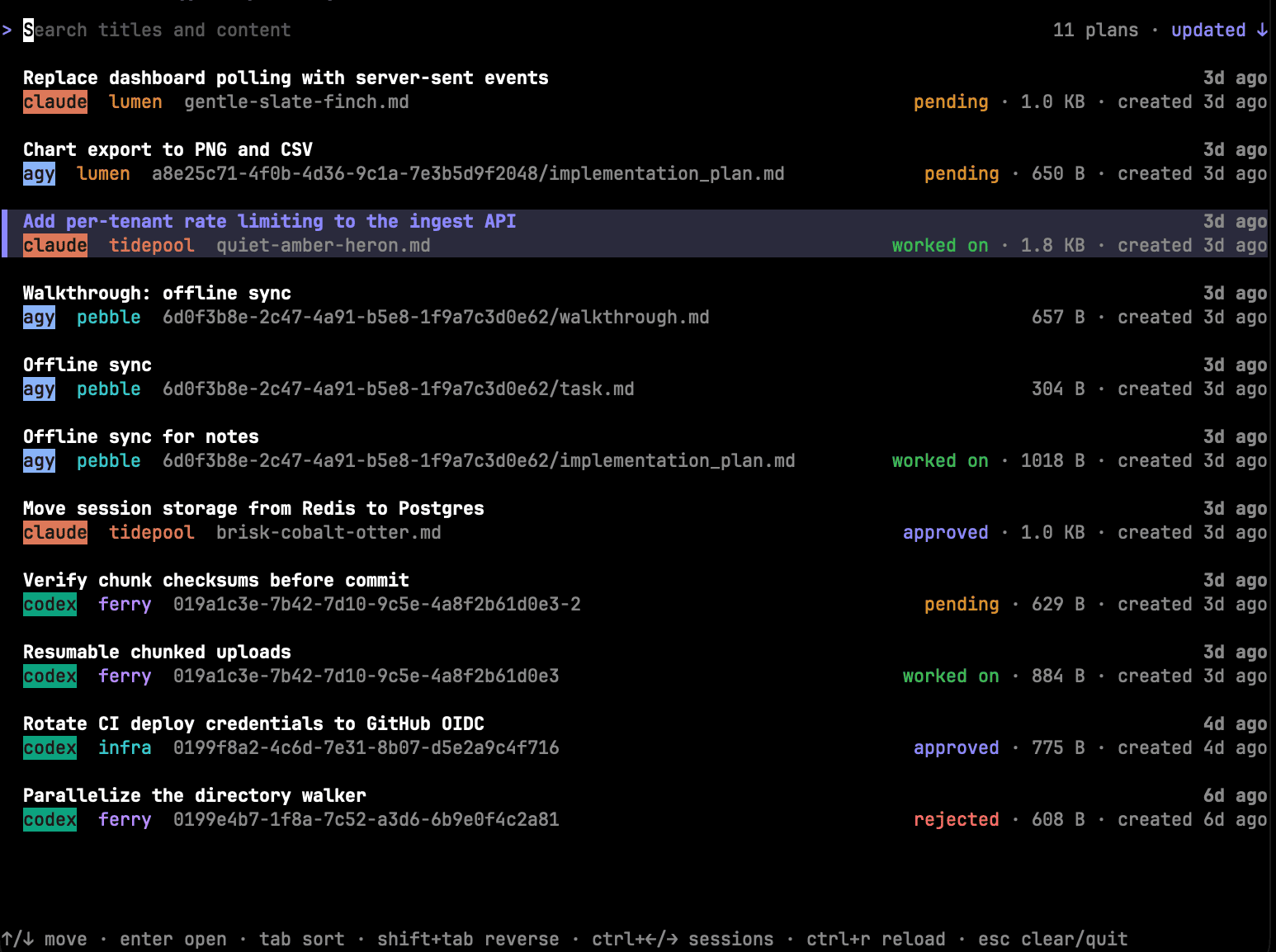
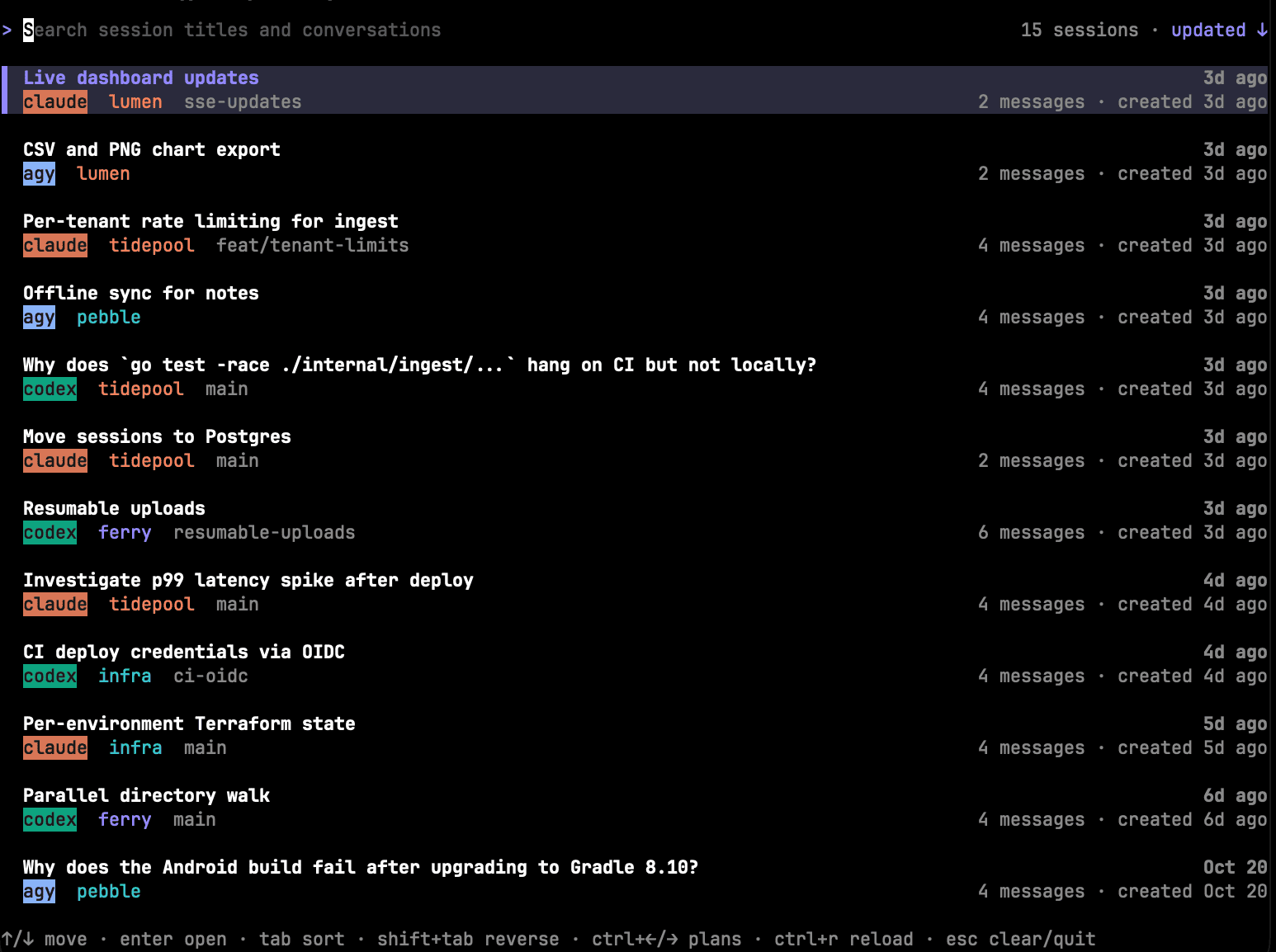
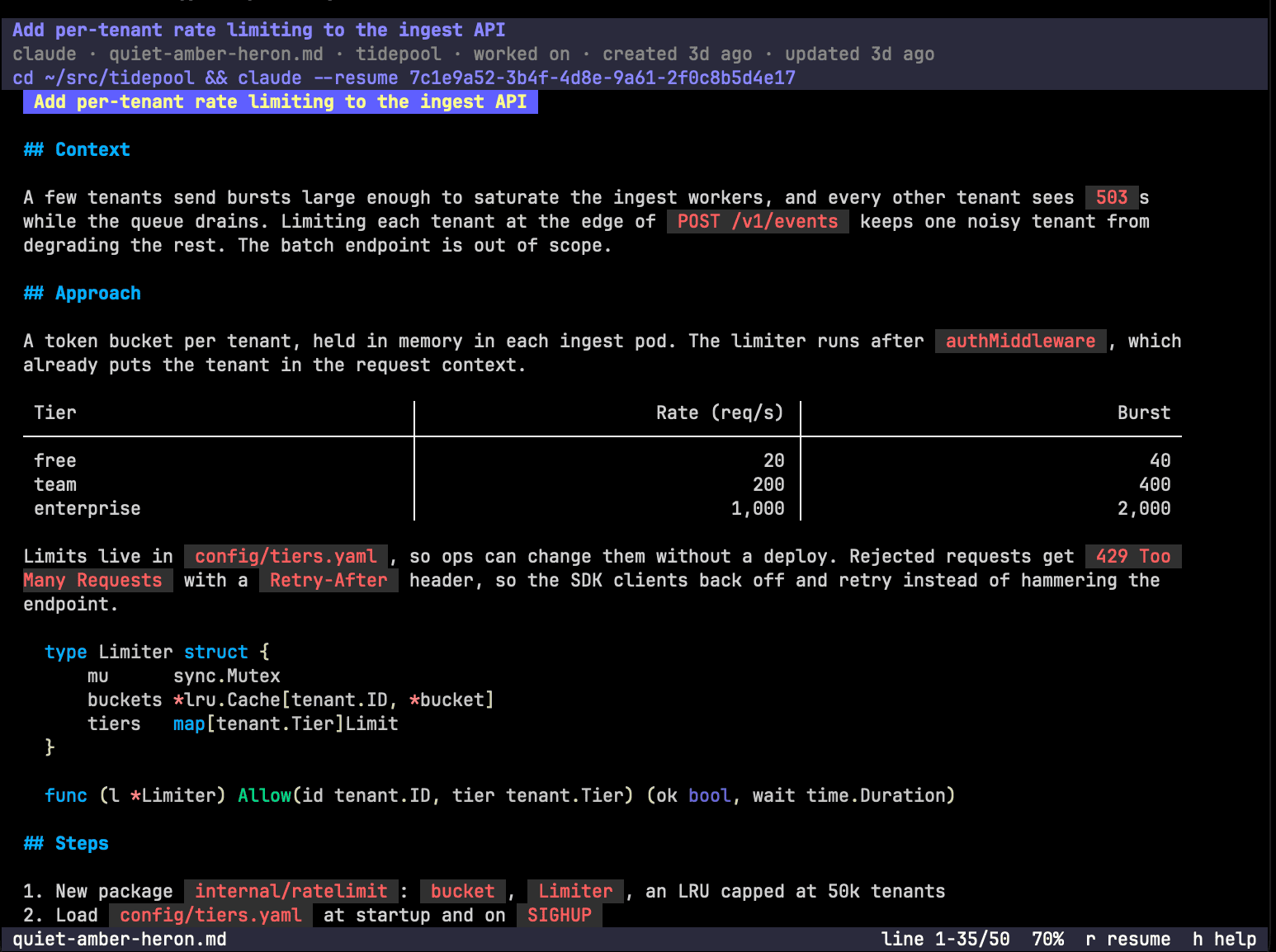
I recently built planviewer, which helps with this. In keeping with my work/life balance ethos, I have 2 aliases:
alias plans='go run github.com/nbr23/planviewer@latest -claude-dir ~/dotfiles/claude -codex-dir ~/dotfiles/codex/'
alias wplans='go run github.com/nbr23/planviewer@latest -claude-dir ~/dotfiles/claudework -codex-dir ~/dotfiles/workcodex/ -agy-dir ~/dotfiles/geminiwork/ -cache-dir ~/Library/Caches/planviewerwork'
These let me search and find sessions and plans easily by matching terms not only in the session/plan titles, but their contents and the entire session conversations too.
It searches across the different harnesses as well, for when I don’t remember if I worked on something using claude, codex, or agy!
Increased session retention
To make planviewer even more valuable, I bumped the session retention setting to a full year (it controls the plans and transcript retention and defaults to 30 days) in Claude’s settings.json:
{
  "cleanupPeriodDays": 365
}
Skills, commands, and other fancy things
My Claude usage is kind of boring. At work I use a few MCP servers to reach the different cloud/SaaS providers we have. My global AGENTS.md files are simple, and I don’t really have skills worth sharing directly, but here are a few “highlights”:
- A
/qaskill, that leverages Playwright to run scenarios/charters against my apps. Some of them are non deterministic, so having an actual “eye + brain”, albeit non-human, using the app, filing bug reports, validating fixes etc is neat. - I used to write a daily work journal (and I still do, but less) to keep track of the work I had done during the day, the things I had pending, and the things I wanted to do the next day. In addition to helping me wrap up my days and organize my thoughts, it helped me not forget half of my work during standup. I now have a
/standupskill to recap my week’s significant work based on commit and ticket history./halfreviewdoes the same over the past 6 months, in preparation for my performance reviews. - A
/whatsnextskill that helps me find the next ticket to work on based on some criteria. - I recently added a
/buttinseatskill, which keeps track of my in-office days by looking up the IP I work from each day of the week, and reminds me where I stand against our in office policy (I do pretty good!).
VS Code / VSCodium / Agent tweaks
I usually run Claude/Codex from the integrated terminal in VS Code (for work stuff) or VSCodium (for personal projects). I made a few adjustments to my configuration to make things easier:
Terminal profiles for each alias
Integrated terminal profiles in VSCodium to quickly launch agent containers are somewhat useful. Closing the agent closes the terminal, so you won’t see the quick resume command or your history anymore. But we have planviewer for that!
{
 "terminal.integrated.profiles.osx": {
      "claude": { "path": "bash", "args": ["-lic", "claude"], "color": "terminal.ansiRed" },
      ...
      "codex":   { "path": "bash", "args": ["-lic", "codex"],   "color": "terminal.ansiBlue" },
  }
}
Prevent misclicks from killing my containers
Not that I’ve ever unintentionally clicked the close button on VSCodium and lost all my integrated terminals and their Claude sessions in the process…
{
  "terminal.integrated.confirmOnExit": "hasChildProcesses",
  "terminal.integrated.confirmOnKill": "always"
}
Fix multiline prompts
In VSCodium/VS Code’s keybindings.json, this makes Shift+Enter send a new line and allows multiline prompts:
[
  {
    "key": "shift+enter",
    "command": "workbench.action.terminal.sendSequence",
    "args": {
      "text": "\u001b\r"
    },
    "when": "terminalFocus"
  }
]
Disabling annoying TUI, mouse control and fancy things
These might be more user preference than IDE integration, but here are some settings to keep Claude/Codex as regular non fancy CLI apps:
Claude:
{
  "tui": "default"
}
Codex:
[tui]
alternate_screen = "never"
A few VS Code/VSCodium settings to keep things to my taste:
{
    "editor.accessibilitySupport": "off",
    "terminal.integrated.fontFamily": "DejaVu Sans Mono, Menlo, monospace",
    "terminal.integrated.macOptionIsMeta": true,
    "terminal.integrated.scrollback": 3000,
    "terminal.integrated.mouseWheelScrollSensitivity": 3,
    "terminal.integrated.initialHint": false,
    "terminal.integrated.suggest.enabled": false,
    "terminal.integrated.stickyScroll.enabled": false,
    "terminal.integrated.shellIntegration.decorationsEnabled": "never",
    "terminal.integrated.altClickMovesCursor": false,
    "terminal.integrated.minimumContrastRatio": 1,
    "terminal.integrated.drawBoldTextInBrightColors": false,
}
Conclusion
None of this is revolutionary, but it has allowed me to run agents with some confidence that I won’t be the next “AI WIPED MY WHOLE LIFE” victim. Telling apart work and personal agents has prevented awkward situations, and being able to search efficiently through all my session’s history has been a huge time saver.
A few accepted risks should be noted:
- I don’t filter network egress at all.
- The current directory is shared with the container, so if it contains secrets,
.gitfolders (.git/hooks!) etc., the agent has access and can read/write them and potentially trick the host into running code.
I am dating this setup to October 2026, as things evolve fast… A year or so ago, I thought I was pretty clever for having Claude write my commits and find the proper Jira ticket ID for the commit, so all this might look very lame in 6 months (or tomorrow).